
Script reads pdf, extracts to json but doesn't work with checkbox with values
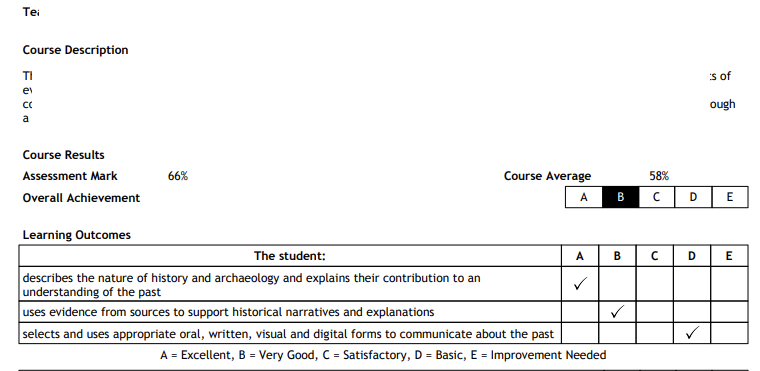 Figure 2: Project Prüfung - Checkbox Sample 2.
Starting Point
Extract checkbox values (user input), I have bunch of image (see above layouts)
Attempt 1: cv2
import cv2
import json
import os
import numpy as np
from paddlex import create_pipeline
from paddleocr import PaddleOCR
import sys


def check_square_for_tick(page_img, x, y, size):
    """
    Crops the checkbox region and checks if it contains a tick or X ma`rk.
    """
    h, w, _ = page_img.shape

    # Ensure coordinates stay within image boundaries
    x1, y1 = max(0, x), max(0, y)
    x2, y2 = min(w, x + size), min(h, y + size)

    # Crop the checkbox bounding box
    crop = page_img[y1:y2, x1:x2]
    if crop.size == 0:
        return False

    # Convert to grayscale and apply inverse thresholding
    gray = cv2.cvtColor(crop, cv2.COLOR_BGR2GRAY)
    _, thresh = cv2.threshold(gray, 180, 255, cv2.THRESH_BINARY_INV)

    # Check the perimeter/border to exclude the outer square box line
    # We only want to count pixels *inside* the box
    border = 3
    if thresh.shape[0] > border * 2 and thresh.shape[1] > border * 2:
        inner_crop = thresh[border:-border, border:-border]
    else:
        inner_crop = thresh

    # Calculate density percentage of dark pixels
    total_pixels = inner_crop.size
    filled_pixels = np.count_nonzero(inner_crop)
    density = (filled_pixels / total_pixels) * 100

    # If inner box pixel density is above 12%, a tick/cross exists
    return density > 12.0

def process_checkboxes_with_paddlex(file_path):

    output_dir = "./output_directory/"
    os.makedirs(output_dir, exist_ok=True)

    for idx, res in enumerate(output):
        # 1. Get the visual layout of this page to scan checkboxes
        # If your input is a multi-page PDF, PaddleX saves images as input_name_page_X.png
        base_name = os.path.splitext(os.path.basename(file_path))[0]
        page_img_path = os.path.join(output_dir, f"{base_name}_{idx}_ocr_res_img.png")

        # Throw if not found
        if not os.path.exists(page_img_path):
            sys.exit(f"Error: Required image file not found at '{page_img_path}'.")

        page_img = cv2.imread(page_img_path)
        if page_img is None:
            continue

        # 3. Find structural boxes using OpenCV Contours (Filters for your exact sizes)
        gray = cv2.cvtColor(page_img, cv2.COLOR_BGR2GRAY)
        blurred = cv2.GaussianBlur(gray, (3, 3), 0)
        edges = cv2.Canny(blurred, 50, 150)

        contours, _ = cv2.findContours(edges, cv2.RETR_TREE, cv2.CHAIN_APPROX_SIMPLE)

        detected_checkboxes = []

        for cnt in contours:
            x, y, w, h = cv2.boundingRect(cnt)
            aspect_ratio = float(w) / h

            # Target check: Aspect ratio must be close to a perfect square (0.85 to 1.15)
            # Size must fit into your bounds (35px to 45px)
            if 0.85 <= aspect_ratio <= 1.15 and (33 <= w <= 47) and (33 <= h <= 47):
                # Avoid duplicate contour registrations on thick borders
                if any(abs(x - db['x']) < 5 and abs(y - db['y']) < 5 for db in detected_checkboxes):
                    continue

                size = max(w, h)
                is_ticked = check_square_for_tick(page_img, x, y, size)

                detected_checkboxes.append({
                    "x": x,
                    "y": y,
                    "size": size,
                    "is_ticked": is_ticked
                })

                # Draw visual bounding box onto the PaddleX output image
                color = (0, 255, 0) if is_ticked else (0, 0, 255) # Green if ticked, Red if empty
                cv2.rectangle(page_img, (x, y), (x + size, y + size), color, 2)
                cv2.putText(page_img, "Ticked" if is_ticked else "Empty", (x, y - 5),
                            cv2.FONT_HERSHEY_SIMPLEX, 0.4, color, 1)

        # Save annotated image overlay
        cv2.imwrite(os.path.join(output_dir, f"annotated_page_{idx}.png"), page_img)

        # Print detected box list results
        print(f"\n--- Page {idx} Checkbox Report ---")
        for box in detected_checkboxes:
            print(f"Position: ({box['x']},{box['y']}) | Size: {box['size']}x{box['size']} | Checked: {box['is_ticked']}")

# Run the function
def read_pdf(file_path):

    pipeline = create_pipeline(pipeline="OCR")

    output = pipeline.predict(
        input=file_path,
        use_doc_orientation_classify=False,
        use_doc_unwarping=False,
        use_textline_orientation=False,
    )
    for res in output:
        res.print()
        res.save_to_img(save_path="./output_directory/")
        res.save_to_json(save_path="./output_directory/")


# Example usage:
# Replace 'your_file.pdf' with the actual path to your PDF
read_pdf("test_file.pdf")

process_checkboxes_with_paddlex("test_file.pdf")
Result: ❌ Failed. Detects Checkboxes, YES/NO. But fails at [1..5] graded checkboxes
Attempt 2: PaddleOCR
import cv2
import json
import os
import logging
import numpy as np
from paddlex import create_pipeline
from paddleocr import PaddleOCR
import sys

# Initialize PaddleOCR once globally using non-deprecated configuration flags
ocr_engine = PaddleOCR(use_textline_orientation=False, lang='en')

def check_square_for_tick(page_img, x, y, size, ocr):
    """
    Crops the checkbox region, ensures it doesn't contain a number/text using OCR,
    and then checks if it contains a tick or X mark using pixel density.
    """
    h, w, _ = page_img.shape

    # Ensure coordinates stay within image boundaries
    x1, y1 = max(0, x), max(0, y)
    x2, y2 = min(w, x + size), min(h, y + size)

    # Crop the checkbox bounding box
    crop = page_img[y1:y2, x1:x2]
    if crop.size == 0:
        return False

    # --- STEP 1: OCR Filtering ---
    # Run the updated non-deprecated predict method on the small cropped checkbox
    ocr_result = ocr.predict(crop)

    if ocr_result and ocr_result[0]:
        for line in ocr_result[0]:
            text = line[1][0].strip()
            # If the cropped box contains numbers or letters, it is not a tick mark
            if any(char.isalnum() for char in text):
                return False

    # --- STEP 2: Density Verification (For Ticks/Crosses) ---
    # Convert to grayscale and apply inverse thresholding
    gray = cv2.cvtColor(crop, cv2.COLOR_BGR2GRAY)
    _, thresh = cv2.threshold(gray, 180, 255, cv2.THRESH_BINARY_INV)

    # Check the perimeter/border to exclude the outer square box line
    border = 3
    if thresh.shape[0] > border * 2 and thresh.shape[1] > border * 2:
        inner_crop = thresh[border:-border, border:-border]
    else:
        inner_crop = thresh

    # Calculate density percentage of dark pixels
    total_pixels = inner_crop.size
    filled_pixels = np.count_nonzero(inner_crop)
    density = (filled_pixels / total_pixels) * 100

    # If inner box pixel density is above 12% and has no text, a tick/cross exists
    return density > 12.0

def process_checkboxes_with_paddlex(file_path):

    pipeline = create_pipeline(pipeline="OCR")

    output = pipeline.predict(
        input=file_path,
        use_doc_orientation_classify=False,
        use_doc_unwarping=False,
        use_textline_orientation=False,
    )

    output_dir = "./output_directory/"
    os.makedirs(output_dir, exist_ok=True)

    for idx, res in enumerate(output):

        # res.print()
        res.save_to_img(save_path="./output_directory/")
        # res.save_to_json(save_path="./output_directory/")

        base_name = os.path.splitext(os.path.basename(file_path))[0]
        page_img_path = os.path.join(output_dir, f"{base_name}_{idx}_ocr_res_img.png")

        # Guard clause using sys.exit
        if not os.path.exists(page_img_path):
            sys.exit(f"Error: Required image file not found at '{page_img_path}'.")

        page_img = cv2.imread(page_img_path)
        if page_img is None:
            continue

        # Find structural boxes using OpenCV Contours
        gray = cv2.cvtColor(page_img, cv2.COLOR_BGR2GRAY)
        blurred = cv2.GaussianBlur(gray, (3, 3), 0)
        edges = cv2.Canny(blurred, 50, 150)

        contours, _ = cv2.findContours(edges, cv2.RETR_TREE, cv2.CHAIN_APPROX_SIMPLE)

        detected_checkboxes = []

        for cnt in contours:
            x, y, w, h = cv2.boundingRect(cnt)
            aspect_ratio = float(w) / h

            # Target bounds (33px to 47px)
            if 0.85 <= aspect_ratio <= 1.15 and (33 <= w <= 47) and (33 <= h <= 47):
                # Avoid duplicate contour registrations on thick borders
                if any(abs(x - db['x']) < 5 and abs(y - db['y']) < 5 for db in detected_checkboxes):
                    continue

                size = max(w, h)
                # Pass the global ocr_engine to the detection function
                is_ticked = check_square_for_tick(page_img, x, y, size, ocr_engine)

                detected_checkboxes.append({
                    "x": x,
                    "y": y,
                    "size": size,
                    "is_ticked": is_ticked
                })

                # Draw visual bounding box onto the PaddleX output image
                color = (0, 255, 0) if is_ticked else (0, 0, 255) # Green if ticked, Red if empty
                cv2.rectangle(page_img, (x, y), (x + size, y + size), color, 2)
                cv2.putText(page_img, "Ticked" if is_ticked else "Empty", (x, y - 5),
                            cv2.FONT_HERSHEY_SIMPLEX, 0.4, color, 1)

        # Save annotated image overlay
        cv2.imwrite(os.path.join(output_dir, f"annotated_page_{idx}.png"), page_img)

        # Print detected box list results
        print(f"\n--- Page {idx} Checkbox Report ---")
        for box in detected_checkboxes:
            print(f"Position: ({box['x']},{box['y']}) | Size: {box['size']}x{box['size']} | Checked: {box['is_ticked']}")


# process the file
process_checkboxes_with_paddlex("test_file.pdf")
Result: ❌ Failed. Somehow this was even worse - detects the checkboxes - but not the values.
PIVOT
- Can we try croping the image to just "checkbox table area" and see if detection improves?
- Can we try adjusting the checkbox's inner content and see if detection improves?
Attempt X: slice to target area and inspect
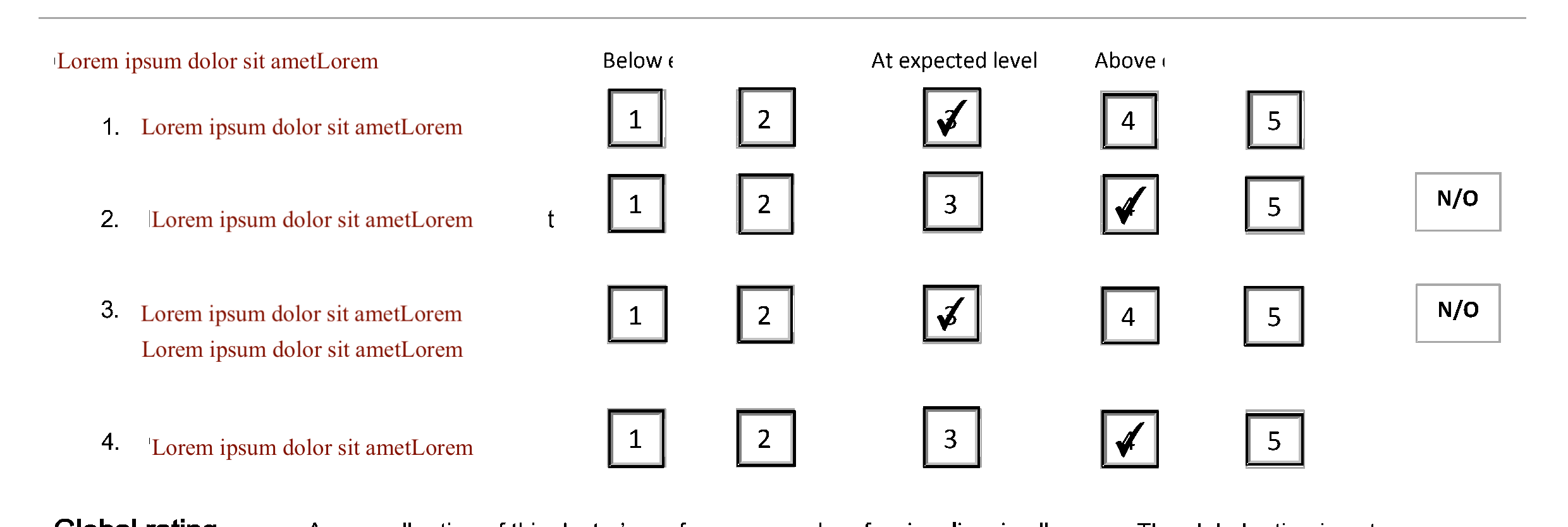 Figure 1: Project Prüfung - Checkbox Sample 1.
# uv run slice_image.py
import pdfplumber
from pdf2image import convert_from_path
import os

def slice_pdf_by_coordinates(pdf_path, x, y, width, height, output_image_name="sliced_output.png", page_num=1):
    """
    Slices a PDF page using coordinates (in points) and saves it as an image.

    Parameters:
    pdf_path (str): Path to input PDF file.
    x, y (int/float): The top-left starting corner coordinate inside the PDF.
    width, height (int/float): The dimensions of the bounding box to crop.
    output_image_name (str): Filename for the saved image slice (must end in .png).
    page_num (int): The target page index (1-based counting).
    """
    # Define bounding crop box parameters [x0, y0, x1, y1]
    crop_box = (x, y, x + width, y + height)

    print(f"Opening PDF to crop region: X={x}, Y={y}, W={width}, H={height}")

    with pdfplumber.open(pdf_path) as pdf:
        # Check if the page exists
        if page_num > len(pdf.pages):
            print(f"Error: PDF only has {len(pdf.pages)} pages. Cannot access page {page_num}.")
            return

        page = pdf.pages[page_num - 1]

        # Crop the structural bounding area inside the PDF vector model
        cropped_page = page.crop(crop_box)

        # Render the isolated vector crop box into a high-resolution image object (300 DPI)
        # to ensure the checkboxes and text lines remain completely clear
        img_obj = cropped_page.to_image(resolution=300)

        # Save the rendered image slice using your exact filename parameter
        img_obj.save(output_image_name, format="PNG")
        print(f"Success! Slice saved cleanly as: {output_image_name}")

# ==========================================
# Example Usage:
# ==========================================
# Let's say your checkbox grid sits at X=100, Y=250, Width=500, Height=200 on page 1:
pdf_file = "test_file.pdf"


# Check if target dummy file exists before running example snippet
if os.path.exists(pdf_file):

    # [{'x': 236, 'y': 475, 'w': 26, 'h': 27}]
    target_image_name = "image_chkbox.png"
    slice_pdf_by_coordinates(
        pdf_path=pdf_file,
        x=236,
        y=475,
        width=26,
        height=27,
        output_image_name=target_image_name,
        page_num=1
    )

    # -- slice the checkbox table
    # target_image_name = "checkbox-sample2.png"
    # (0, 0.0, 595.32, 841.92)
    # slice_pdf_by_coordinates(
    #     pdf_path=pdf_file,
    #     x=0,
    #     y=450,
    #     width=595.32,
    #     height=200,
    #     output_image_name=target_image_name,
    #     page_num=1
    # )
else:
    print(f"Please replace '{pdf_file}' with your real file path to execute the crop.")
# uv run read_slice_with_chkbox.py
import cv2
import numpy as np
import json
import os

def extract_form_scores_to_json(image_path, output_json_path="assessment_results.json"):
    # 1. Load image and convert to grayscale
    img = cv2.imread(image_path)
    if img is None:
        print(f"Error: Could not load image from path '{image_path}'")
        return

    gray = cv2.cvtColor(img, cv2.COLOR_BGR2GRAY)

    # 2. Binary thresholding (Invert so marks are white, background is black)
    # 2. Adaptive thresholding to handle text and ticks cleanly
    thresh = cv2.adaptiveThreshold(gray, 255, cv2.ADAPTIVE_THRESH_GAUSSIAN_C, cv2.THRESH_BINARY_INV, 11, 2)

    # 3 - old. Find square-like contours (the checkboxes)
    # contours, _ = cv2.findContours(thresh, cv2.RETR_TREE, cv2.CHAIN_APPROX_SIMPLE)

    # 3. Find ONLY the outermost contours (RETR_EXTERNAL ignores inside numbers)
    contours, _ = cv2.findContours(thresh, cv2.RETR_EXTERNAL, cv2.CHAIN_APPROX_SIMPLE)

    print(len(contours))

    boxes = []
    for cnt in contours:
        x, y, w, h = cv2.boundingRect(cnt)
        aspect_ratio = float(w) / h

        # Filter for squares matching your checkbox scale (25px to 55px)
        # 1. Broadened size range slightly to adapt to PDF slicing resolutions
        if 0.80 <= aspect_ratio <= 1.20 and (25 <= w <= 65) and (25 <= h <= 65):
            boxes.append({'x': x, 'y': y, 'w': w, 'h': h})

        # if 0.80 <= aspect_ratio <= 1.20 and (20 <= w <= 65) and (20 <= h <= 65):
        #     # Avoid duplicate internal/external contour detections of the same box
        #     if any(abs(x - b['x']) < 6 and abs(y - b['y']) < 6 for b in boxes):
        #         continue
        #     boxes.append({'x': x, 'y': y, 'w': w, 'h': h})


    if not boxes:
        print("No checkboxes detected in the image.")
        return


    # 4. Group boxes into distinct horizontal rows using their Y coordinates
    boxes = sorted(boxes, key=lambda b: b['y'])

    rows = []
    current_row = [boxes[0]]

    # for box in boxes[1:]:
    #     # If the box is on a similar horizontal line (within 15 pixels), it's the same row
    #     if abs(box['y'] - current_row[0]['y']) < 15:
    #         current_row.append(box)
    #     else:
    #         rows.append(current_row)
    #         current_row = [box]
    # rows.append(current_row) # Append the last row

    for box in boxes[1:]:
        if abs(box['y'] - current_row[0]['y']) < 15:
            current_row.append(box)
        else:
            rows.append(current_row)
            current_row = [box]
    rows.append(current_row)

    # Sort rows structurally from top to bottom
    rows = sorted(rows, key=lambda r: r[0]['y'])


    # Map criteria labels exactly to the form layout order
    criteria = [
        "1. First Step",
        "2. Second Step",
        "3. Third Step",
        "4. Fourth Step",
    ]

    # Initialize dictionary structure for JSON storage
    extracted_data = {
        "source_file": os.path.basename(image_path),
        "assessment_scores": {}
    }

    # 5. Process each row from left to right to find the checked value
    for i, row in enumerate(rows):
        if i >= len(criteria):
            break # Avoid any auxiliary boxes (like trailing N/O fields) out of scope

        # print(row)

        # Sort checkboxes within the row from left to right
        sorted_boxes = sorted(row, key=lambda b: b['x'])

        # print(sorted_boxes)

        # We only isolate the first 5 option boxes (Scores 1 through 5)
        rating_boxes = sorted_boxes[:5]
        detected_score = None


        # print(rating_boxes)

        for col_idx, box in enumerate(rating_boxes):
            # Crop inside box (shave off 4 pixels of border frame noise)
            crop = thresh[box['y']+4 : box['y']+box['h']-4, box['x']+4 : box['x']+box['w']-4]
            if crop.size == 0:
                continue

            total_pixels = crop.size
            filled_pixels = np.count_nonzero(crop)
            density = (filled_pixels / total_pixels) * 100

            # Handwritten checkmarks create high visual ink footprint density (>15%)
            if density > 15.0:
                detected_score = col_idx + 1 # Indices 0-4 yield scores 1-5
                break

        # Add entry data to dictionary array
        extracted_data["assessment_scores"][criteria[i]] = detected_score

    # # 6. Save the structured dict into a clean format JSON file
    # with open(output_json_path, 'w', encoding='utf-8') as json_file:
    #     json.dump(extracted_data, json_file, indent=4, ensure_ascii=False)

    # print(f"Success! Extracted values written to: {output_json_path}")

    # Print preview payload to terminal
    print(json.dumps(extracted_data, indent=4))

# Execution
extract_form_scores_to_json("checkbox-sample2.png", "assessment_results.json")
 Figure 3: Project Prüfung - Checkbox Sample 3.
Result: ❌ Failed.
- Fails at [1..5] graded checkboxes - always detects item 1 as checked (possibly code issue)
- PAUSE - need to circle back later - moving with extracted data.
Reality check
!!? Why do I like torturing myself?
Disclaimer
This post describes technical concepts and lessons I explored during a learning project. Examples and datasets have been recreated or anonymised for demonstration purposes and do not represent any production system, customer data, or confidential information.
If this looks suspiciously familiar, that is probably because document retrieval problems are remarkably universal. Any resemblance to a particular organisation's problems is, conveniently, not the subject of this post.
The purpose of this post is educational: to explore the practical challenges of OCR, retrieval-augmented generation, evidence grounding, and evaluation. It is not intended to describe or disclose the internal systems, processes, or information of any former employer or organisation.